Dynamic QR codes · vCards · AR
Print it once.
Change it whenever.
BuildYourQR makes QR codes that point wherever you tell them, today, next month, after the menu changes. Put them on flyers, cards and packaging, then edit the link, see who scanned, and never reprint because a URL moved.
- No app for the people scanning
- Your colours and logo
- Free to start
brunch10:00 to 14:00 · Harbourside
Maya Fernandes
Head baker · Olive & Oak Bakery
Sourdough every morning from 7. Ask about wedding cakes.
The one-minute version
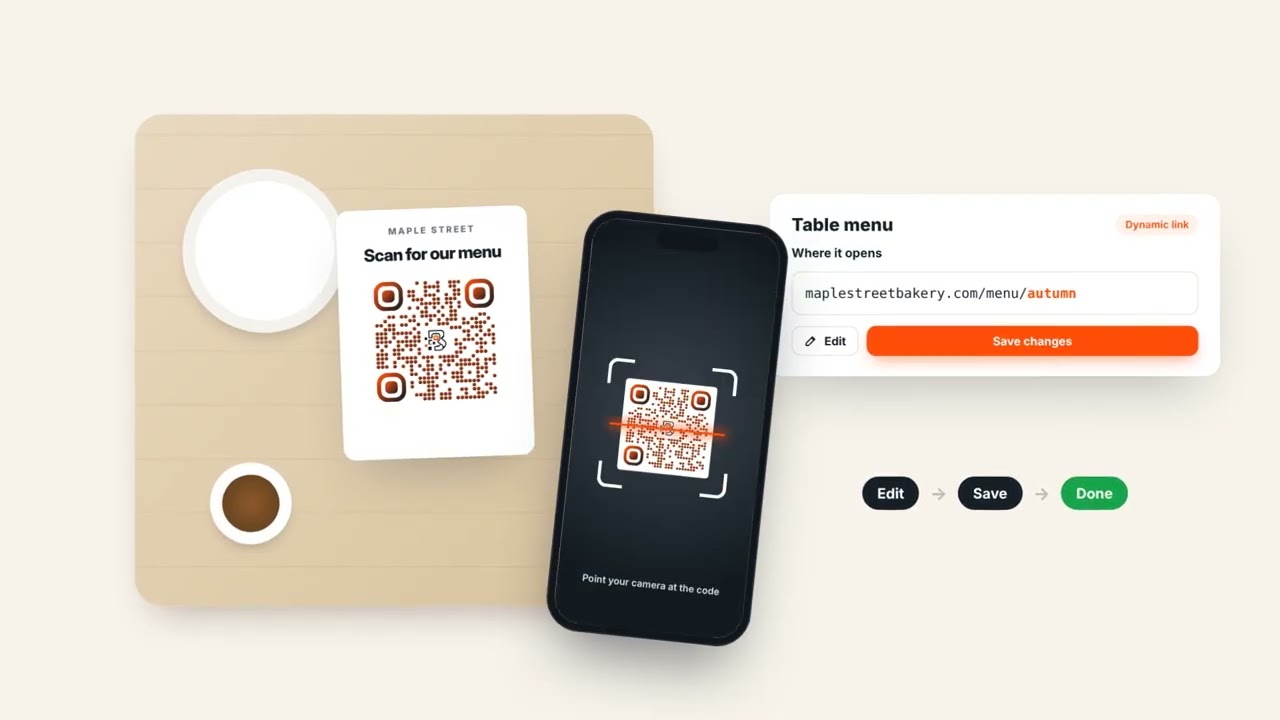
A café changes its menu. The table cards don’t.
Maple Street prints one code on every table card. When autumn comes the menu moves to a new page, so they open BuildYourQR, change the link and press save. Nobody reprints anything, and the next person who scans gets the autumn menu.
- 01 Edit the link
- 02 Save
- 03 Same card, new menu
What is a dynamic QR code?
A dynamic QR code is a QR code whose destination can be changed after it has been printed. An ordinary (static) QR code stores the web address itself in its pattern, so changing the page, fixing a typo or ending a promotion means printing new codes. A dynamic code stores a short link instead, such as buildyourqr.com/q/Mn4vK2x, and that link forwards to whatever address you choose. Edit the destination in your dashboard and every copy already on posters, menus and business cards opens the new page, with no reprint. Because every scan passes through the short link, dynamic codes can also count scans, unique visitors, devices and locations. BuildYourQR makes dynamic codes for website links, digital business cards (vCard) and augmented-reality video ads, and lets you pause any code or point it somewhere new at any time.
| Static QR code | Dynamic QR code | |
|---|---|---|
| Change the destination after printing | No | Yes |
| Scan analytics | No | Scans, unique visitors, device, city |
| Pause and resume | No | Yes |
| Needs an app to scan | No | No |
| Stops working if the link changes | Yes | No |
The problem with ordinary QR codes
You printed 5,000 flyers.
Then the link changed.
An ordinary QR code is the URL itself, drawn as squares. Change the page, fix a typo, end a promo, and every printed copy still points at the old address. That’s the whole reason dynamic codes exist.
Try it: switch between the two and type a new address.
Keep typing. The code never changes. Only the page it forwards to does.
What you can make
Three kinds of code. One dashboard.
Links that you can re-point
Send people to a menu, a booking page, a sale, a form. When it changes, change the link, not the print. Pause a code between campaigns and bring it back later.
- Edit the destination any time
- Pause and resume without reprinting
- PNG for screens, SVG for the printer
A business card that updates itself
Your name, number, email, address and socials on a clean mobile page, with one tap to save you to their contacts. New job title? New number? Edit it once and the card in everyone’s wallet is already current.
- “Save contact” works on iPhone and Android
- Your photo and colours
- Live preview while you type
Maya Fernandes
Head baker · Olive & Oak Bakery
Sourdough every morning from 7. Ask about wedding cakes.
Print that plays video
Point a phone at your poster and a video plays right on top of it, in augmented reality, in the browser. Good for product launches, gig posters and anything that looks better moving.
- No app, works in the phone’s browser
- Upload an MP4 or paste a link
- Counted in your analytics like any other code
Running
Club
Analytics
Know which flyer actually worked.
Every code gets its own report: scans per day, unique people, the phones and browsers they used, the cities they scanned from, and what time of day your print does its best work.
- Scans & unique visitors
- 7, 30 or 90 days, in your time zone.
- Where and on what
- Country, city, device, OS and browser.
- Private by design
- Scan statistics never store IP addresses. How we count scans.
Make it yours
It’s going on your packaging.
It should look like you.
Colours or a gradient, six dot styles, rounded or square corners, your logo in the middle and a “Scan me” frame. Save it once as your brand kit and every new code starts on-brand.
Brands above are made up. The codes are real and scannable. They open this page.
- 1~1 min
Pick what it opens
A link, a contact card or an AR video. Paste the URL or fill in your details.
- 2~1 min
Style it
Colours, dots, corners, logo, frame. Or apply your saved brand kit in one click.
- 3~1 min
Download and print
PNG for screens and social, SVG for the printer. Keep editing afterwards.
Questions
The things people usually ask.
Something else? Sign up and poke around. It’s free to start.
A dynamic QR code points to a short link that you control, not to the final web address, so you can change where it goes after it’s printed. An ordinary QR code has the destination written into its pattern: change the page and you need a new code and a reprint. With BuildYourQR the printed code encodes something like buildyourqr.com/q/Mn4vK2x. When someone scans it we forward them, in a fraction of a second, to whatever destination you’ve set in your dashboard. Edit that destination, and every copy already on menus, posters and business cards opens the new page. Because each scan passes through the short link, dynamic codes can also be paused and counted.
No. Any phone camera reads the code. Contact cards open as a web page with a “Save contact” button, and AR ads run in the mobile browser.
They keep working. When a paid plan ends your account moves to Free, and every code you’ve already made, including ones over the Free limit, keeps scanning and forwarding exactly as before. Nothing is paused or deleted, because printed codes can’t be recalled. What changes is what you can add: on Free you can’t create more than five dynamic codes, add a new logo, save a brand kit or make new AR ads, and analytics show the last 7 days. Upgrade again at any time and everything unlocks straight away, with your codes and their scan history intact.
Anyone who scans it sees a short “this code is paused” page instead of your content. Un-pause it and it works again, same code, no reprint.
For each scan we record the time, a rough location (country and city, looked up from the IP address), the device type, operating system and browser, and the referring site if there is one. We never store the IP address itself. To count unique visitors we keep a one-way hash of the IP address and browser, which can’t be turned back into either. Link-preview bots from chat apps and social networks are filtered out so they don’t inflate your numbers. You see all of this per code, by day and by hour, in your time zone.
Yes. Pick colours or a gradient, a dot style, rounded or square corners, a logo in the middle and a “Scan me” frame. Save it as your brand kit and every new code starts from it.
It should. We switch to the highest error-correction level when a logo is present and warn you if the colours are too low-contrast. Still, test-scan a print proof before a big run. We do.